Connect LinkedIn
Open Connections.
Select New Connection → LinkedIn.
Sign in and approve the requested permissions.
Select the available personal profile or Company Pages.
Complete the connection.
Company Page access depends on the permissions of the LinkedIn user you authorize.
Publish to LinkedIn
Select the account in Create Post, write the caption and add supported images or a video.
Multiple images create a multiple-image post. This does not upload a PDF or LinkedIn document.
Use the available comment field when you want dopost to publish a comment with the post.
Reconnect
When dopost requests renewed authorization, select Reconnect from Connections and sign in with the LinkedIn account that manages the affected profile or Page.
Platform Limits
LinkedIn Mentions
To mention someone on LinkedIn in Dopost, type “@” in the caption editor and start writing the name of the person or company. Type at least 3 characters to load results. Click the result you want and it will be inserted as a bold mention. You can copy this mention and paste it into any of your other LinkedIn accounts, and it will still work.
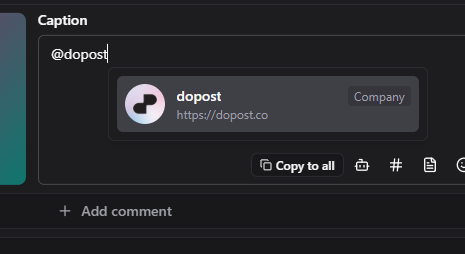
If you’re searching for a company or school and don’t see it, try using the vanity slug from the LinkedIn URL.
Example:https://www.linkedin.com/school/harvard-university/ → search “harvard-university” instead of “Harvard”.
Searching for people only returns followers of your organization. This is a LinkedIn API limitation.
Account limitations:
Personal accounts can only mention companies, schools, universities, etc.
Organization accounts can mention their followers (people) as well as companies, schools, universities, etc.
Mentions can be cross-shared between accounts. For example, you can copy a person mention generated from an organization account and paste it into a personal account’s caption.
Was this helpful?
Still need help? Ask the team